


Thumsters: Behavior Tracker
4.059.00 Reviews
App Specs
- Version
- 4.3.0
- Updated On
- License
- Free
- Downloads
- 10,000+
- Developer
- KØBEN digital
- Categories
- Parenting
- Platform
- Android
Screenshots

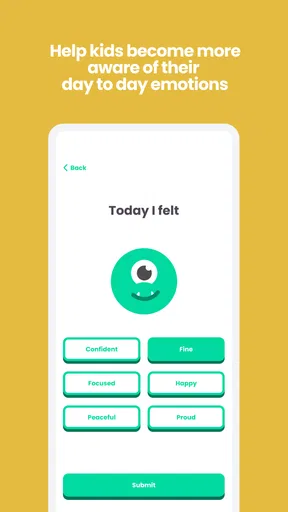

 Analysis by AppCompare
I like a household tool best when it takes a small recurring argument off the family’s plate without turning every task into a new negotiation. Thumsters: Chores Tracker is built around that idea: it gives chores, habits, and behavior a shared place, so parents and children can see what is expected and what has been done. In my view, its biggest promise is not making housework exciting every day; it is making responsibilities easier to explain, remember, and follow up on.
Getting Started with Thumsters
So, you’ve just downloaded Thumsters: Chores Tracker, and the first thing you’ll notice is its intuitive interface. Setting up your household is a breeze. You start by creating profiles for each family member, including the little ones. The app’s colorful and playful design makes it particularly engaging for kids, encouraging them to participate in the chore game.
Once everyone’s onboard, you can start assigning chores. The app allows you to set up tasks by day, week, or even month. Need to remind the kids to feed the dog every day? Done! Want to make sure everyone pitches in for spring cleaning? Easy peasy. The flexibility here is something I really appreciate.
Features that Stand Out
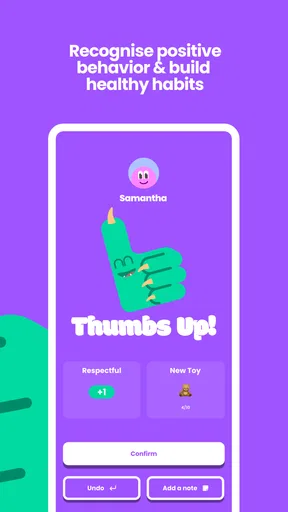
One feature that really caught my eye is the reward system. You can assign points to each task, and family members can rack up these points to earn rewards. This not only makes chores less of a bore but also instills a sense of achievement in everyone involved.
Another thing I love is the app’s notifications. We all have busy lives, and sometimes chores can slip through the cracks. Thumsters sends friendly reminders, ensuring nothing gets missed. Plus, you can customize these notifications to avoid being spammed, which is a thoughtful touch.
Making Rewards Work for Your Family
The reward system is most useful when everyone knows what the points are for before a task is done. I’d agree on a few small, meaningful rewards as a family, then keep the effort needed to earn them proportionate to the prize. If points become a way to price every ordinary contribution, children may start asking what they get for routine cooperation. I’d use rewards to recognize consistency or a new responsibility, rather than making every basic act transactional.
It also helps to keep the first set of chores short. A child who is learning to put away toys or set the table may benefit more from a clear, repeatable task than from a long list covering the whole week. The app’s recurring schedules can make expectations visible, but parents still need to decide what is age-appropriate and explain what “done” means. A checked task is only useful if the family agrees on the standard behind it.
Worth Reading Before You Choose

Flipboard Shows What News Apps Must Do Beyond the Feed

Switching to Android Auto Means Rethinking Your Driving Routine

Google Calendar Makes a Crowded Week Easier to Manage

Ludo King Makes the Most of the Minutes Between Plans

Baby Panda World Brings Quick Play to Modern Phones, but Its Game Library Feels Busy

ESPN’s Live Game View Makes Following Close Games Easier
Network-Dependent Moments and Family Routines
Because this is a shared family organizer, connectivity matters most when people need to see the same information at different times. A parent might set up a task before work, while a child checks what remains after school; another adult may want to review progress later. That shared workflow is where an app can be more convenient than a paper chart pinned to the fridge, especially when family members are not all in the same room.
I would not make an urgent plan depend on a last-minute app check. If a chore affects a pet, a meal, or a time-sensitive commitment, it is sensible to agree on a simple backup reminder at home. Notifications can help with routine prompts, but phone settings, connectivity, and a device being out of reach can all affect whether someone sees one at the right moment. The app works best as a visible aid to a family agreement, not as a substitute for one.
Real-Life Application
In my household, using Thumsters has brought about a noticeable change. My kids, who used to view chores as the ultimate evil, now treat them as part of a fun game. It’s rewarding to see them take responsibility and even remind each other about tasks. My partner and I have also found it easier to keep track of everything without having to nag constantly.
Beyond just chores, the app has improved our family communication. We use the app’s messaging feature to discuss tasks and share progress, which has added a new dimension to our interactions. It’s like having a little family command center right in your pocket.
A Practical After-School Test
Picture a weekday afternoon: one child comes home before a parent, the dog needs feeding, and the kitchen still needs tidying after dinner. A recurring pet-care task can make the first responsibility predictable, while a separate evening chore keeps the shared workload clear. The useful part is that the family can decide in advance who owns each job instead of renegotiating it while everyone is tired. If plans change, a quick conversation still matters; a tracker cannot know that a child has an activity or that a task has already been handled by someone else.
For a smoother routine, I’d review the list once a week rather than adding new demands every day. Remove chores that no longer fit, check whether a recurring task is still assigned fairly, and make sure rewards have not drifted out of proportion. This small reset turns the tracker into a planning aid instead of a growing backlog. It is also a good moment to ask children which jobs feel manageable and which need to be taught again.
Where It Fits Among Household Tools
Compared with a whiteboard or paper chart, Thumsters is more suited to a family that wants recurring schedules, reminders, and progress tied to individual household profiles. A physical chart can be easier for very young children to see at a glance and does not depend on everyone looking at a phone. A general calendar is often better for appointments and shared events, but it can feel cumbersome when the main goal is assigning everyday responsibilities and recognizing completed work.
That distinction matters: I would not replace a family calendar with this app, nor would I expect a chore tracker to solve disagreements about fairness. Its strength is giving chores a dedicated structure. Families who enjoy checking a phone and using points may find that structure motivating; families who prefer a quick visual chart on the wall may get more use from a simple paper routine.
When Things Don’t Go to Plan
Any family system needs a way to recover when a reminder is missed or a task is marked before it is really finished. I’d treat a missed chore as a prompt to clarify the routine, not as proof that the app has failed or that a child is being careless. Check whether the task was assigned clearly, whether the reminder was useful, and whether the timing fits the household. If an entry or message needs attention, discuss the correction together so the tracker stays a shared reference rather than a scoreboard used to catch someone out.
For families with several caregivers, agree on who is responsible for changing assignments and rewards. Otherwise, different adults can make inconsistent edits or give children conflicting expectations. Keeping the rules simple and having one short weekly check-in can prevent the list from becoming another source of household friction. This is especially important when children split time between homes or routines vary from week to week: a shared task list helps only when everyone understands which plan is current.
Data-Conscious Use and Everyday Fit
Since family profiles and messages can involve children, I’d keep the content practical and limited to what the household needs to coordinate. Use task names that make sense to the family, and avoid turning the app into a place for sensitive personal details. Before adding a child, it is worth deciding together how the family will use the tracker and who will be checking progress. That conversation can make the system feel supportive rather than like constant surveillance.
The app is free to start, with optional in-app purchases listed from $1.99 to $79.99 per item, so I’d explore the basic routine first and only consider spending if the app already suits the family’s habits. It has a 4.0 average from 265 ratings and has passed 10K installs; those figures suggest it has found an audience, but they cannot tell you whether its approach will work in your home. It is rated for Everyone, and KØBEN digital has kept it in the parenting space since its release on October 24, 2017. Version 4.1.16 runs on Android 7.0 and later.
For the smoothest start, I’d try one week with a few recurring chores, one reminder pattern, and rewards that are easy to explain. If everyone understands how the list is meant to work, you can add more gradually. If the family already has a reliable paper routine, there may be no reason to move it into an app; if reminders and individual task ownership are the missing pieces, a short trial will make that trade-off clear.
Why Thumsters is a Game Changer
Now, let’s talk about why this app stands out. It’s more than just a chore tracker; it’s a tool for fostering responsibility and teamwork within the family. The app’s design is engaging for kids and practical for adults, striking a perfect balance.
It’s also worth noting that the app supports multiple languages, making it accessible to a diverse range of users. This is a small but significant detail that shows the developers’ commitment to inclusivity.
Moreover, the app is available on both Android and iOS, ensuring that everyone can join in regardless of their device preference. It’s these little details that make a big difference in usability and user experience.
Final Thoughts
Wrapping up, Thumsters: Chores Tracker is a fantastic app that transforms the mundane task of managing household chores into something interactive and fun. It’s a tool that not only gets the job done but does so in a way that brings families closer together. Whether you’re a parent trying to instill a sense of responsibility in your kids or simply someone looking to streamline household management, Thumsters is definitely worth a try.
If you’re ready to revolutionize the way your family tackles chores, you can find the app available for download on both Android and iOS platforms. Happy chore tracking!
Pros
- User-friendly interface for all ages.
- Customizable tasks and rewards.
- Syncs across multiple devices.
- Motivates kids with points system.
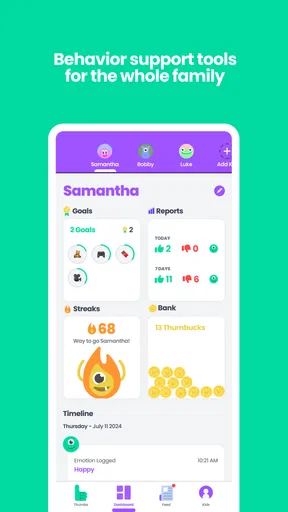
- Supports multiple family members.
Cons
- Limited free version features.
- Occasional sync delays.
- Requires constant internet connection.
- Complex setup for non-tech users.
- No offline mode available.
FAQs for Thumsters: Behavior Tracker
What is Thumsters: Chores Tracker and how does it work?
Thumsters: Chores Tracker is a user-friendly app designed to help families manage household chores efficiently. It allows parents to assign tasks to their children and track their progress. The app uses a reward system to motivate kids, making chores a fun and engaging activity. Users can easily set up tasks, deadlines, and rewards, promoting responsibility and teamwork within the family.
Is Thumsters: Chores Tracker suitable for all ages?
Yes, Thumsters is designed to cater to families with children of various ages. The interface is intuitive enough for young users, while offering customizable features to accommodate older kids and teens. Parents can tailor tasks and rewards according to the age and capabilities of each child, ensuring the app remains effective across different age groups.
Does Thumsters: Chores Tracker require an internet connection?
Thumsters primarily functions offline, allowing users to manage chores without constant internet access. However, certain features such as syncing data across multiple devices or accessing updates may require an internet connection. This makes it convenient for families to keep track of chores even when they’re on the go or have limited connectivity.
What kind of rewards can be set in Thumsters?
Thumsters offers flexible reward options that parents can customize to suit their family’s preferences. Rewards can range from extra screen time, treats, or special outings, to virtual badges and points. This flexibility allows parents to align rewards with their family’s values and ensure that children remain motivated to complete their tasks consistently.
Is there a cost associated with using Thumsters: Chores Tracker?
Thumsters offers a free version with essential features to get started. For families looking for advanced functionality, such as additional customization options and enhanced tracking, a premium version is available as a subscription. This ensures users can choose a plan that best fits their needs and budget, while enjoying the app's full potential.


